

Over the past months, we’ve been dropping hints about what we’ve been working on: Valenz, Marina, Workspace Settings.
With each new release of Nitrux, we’ve added specific components (NudgeOSD, QMLGreet) with one goal, and today, it all comes together.
We have finally achieved the milestone of presenting the new concept for Nitrux: The Workspace Environment.
This framework requires explicit definition.
Background
The concept of the Workspace Environment reinforces our stance from November 2025: Nitrux is not for everyone, and that is intentional. Nitrux targets users who recognize its architecture as a deliberate choice, prioritizing fewer assumptions, clearer intent, and a stronger identity.
In Nitrux 5.0.0, I deployed Waybar and SwayNC to establish the foundation of our modular workspace. They successfully demonstrated our shift away from monolithic desktop environments by providing distinct, single-purpose tools. However, they were always an initial iteration. I thoroughly documented their technical limitations within our GitHub Discussions, which prompted the search for a permanent, first-party solution.
Technical friction further disqualified Waybar and SwayNC. Both tools either rely on GTK or favor GTK-centric paradigms, specifically the use of CSS for styling. My previous experience with QtGreet demonstrated that forcing CSS into this context yields flawed results, which directly catalyzed the creation of QMLGreet. Reintroducing that exact styling mismatch at the shell layer was technically unacceptable.
Next, I evaluated Quickshell because it met a critical requirement: it is QML-first. However, Quickshell functions as a construction framework (what we classify as Layer 3 Infrastructure; see below) rather than a focused end product. Furthermore, relying on an external framework compromises our goal of building a purpose-built, first-party toolchain.
Developing QMLGreet and NudgeOSD during this period prompted a reevaluation of our legacy shell concepts. Inspired by the principle of Simplify, then add lightness, I began engineering the next component: Valenz.
While Valenz initially began as an attempt to extract and reuse components from the legacy Maui Shell, I quickly determined that starting from scratch provided a vastly superior engineering path. Maui Shell was not just a panel and a dock; it was a Wayland shell layer (Cask) and a Wayland compositor (ZPace) inextricably bound together as a monolithic design.
Discarding that legacy codebase allowed me to build Valenz as a strictly independent, modular tool. This approach preserves the classic Unix philosophy: composing small, distinct tools that do one job well but that are bound together by a unified UI framework, as described in Nitrux Core Concepts → Distribution Philosophy → System Architecture → Language Stratification.
Introducing: Valenz
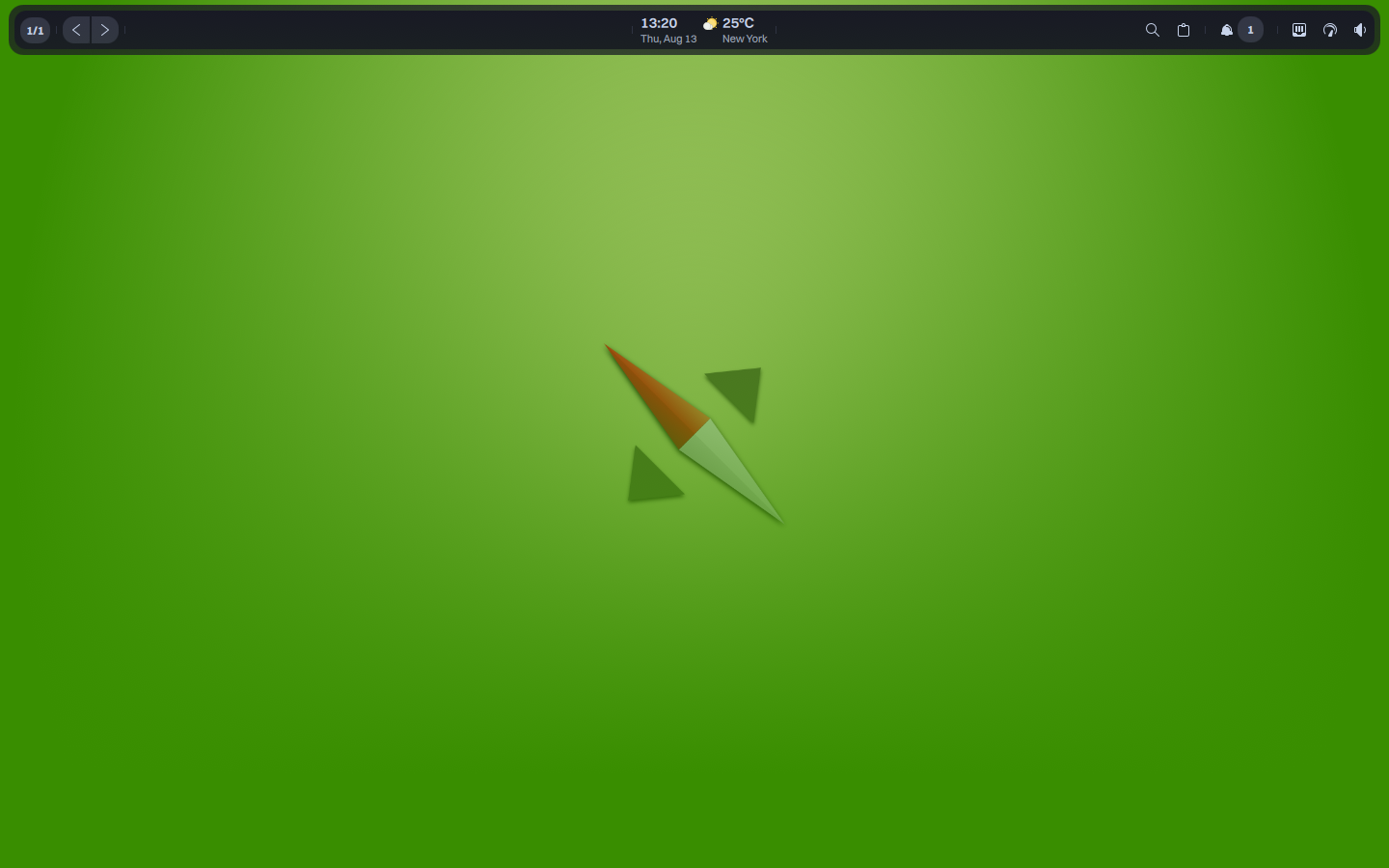
Valenz, a workspace bar.
Valenz is best described as a QML-based workspace shell bar designed for Nitrux. It’s built with MauiKit and LayerShell-Qt.
- Features:
- Media, workspace navigation, tray, and notification controls.
- Control Center indicators for network, Bluetooth, volume, battery, power profile, and night light.
- Weather, calendar, and system resource widgets.
Valenz is intended to sit in the desktop shell layer above the compositor, combining status information with session controls and transient popovers; it extracts the shell responsibility into an independent, QML-based workspace bar.
Introducing: Marina
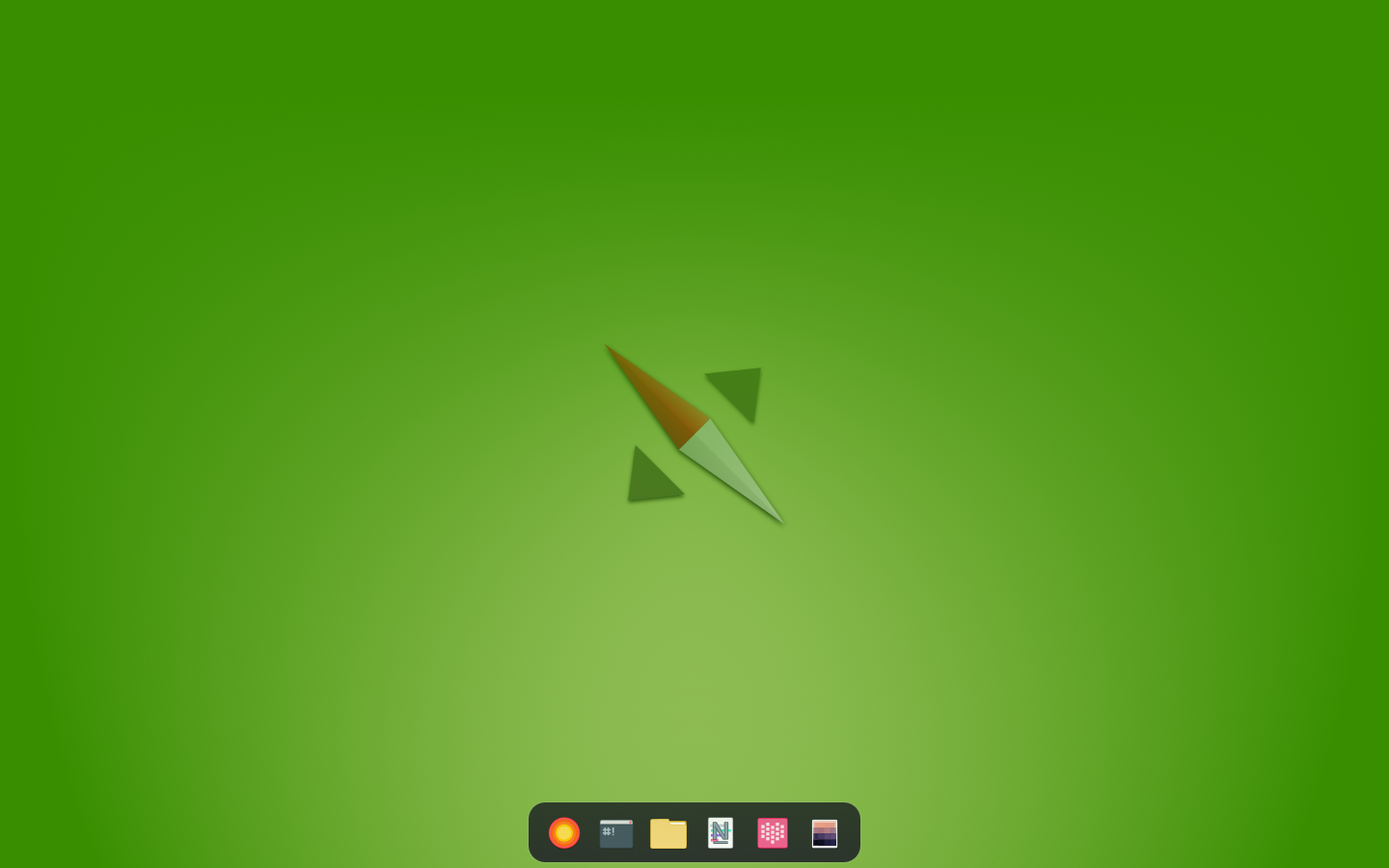
Marina, a workspace dock.
Developing Valenz established a strict engineering standard for our workspace components. Evaluating our existing dock solution, Crystal Dock, against that standard revealed critical architectural friction.
While Crystal Dock utilizes Qt, it relies on legacy Qt Widgets rather than modern QML. This created an immediate UI framework inconsistency alongside Valenz. Furthermore, Crystal Dock includes a broad feature set designed to accommodate varying user preferences, violating our mandate to deploy focused tools without unnecessary overhead. I required a dock, but one built explicitly for our stack.
This requirement catalyzed the development of Marina.
Marina is best described as a QML-based workspace dock designed for Nitrux. Similarly to Valenz, QMLGreet, and NudgeOSD, it’s built with MauiKit and LayerShell-Qt.
- Features:
- Precise space management and multi-output configuration.
- Hyprland integration to track, group, and cycle through open windows across all workspaces using event-driven updates.
- Automatic XDG launcher discovery, drag-to-reorder pinning, horizontal scrolling, optional auto-hide, and standard mouse-click controls.
- Unread-message badges for pinned applications that publish launcher-entry counts, including compatible messaging clients.
Introducing: Workspace Settings
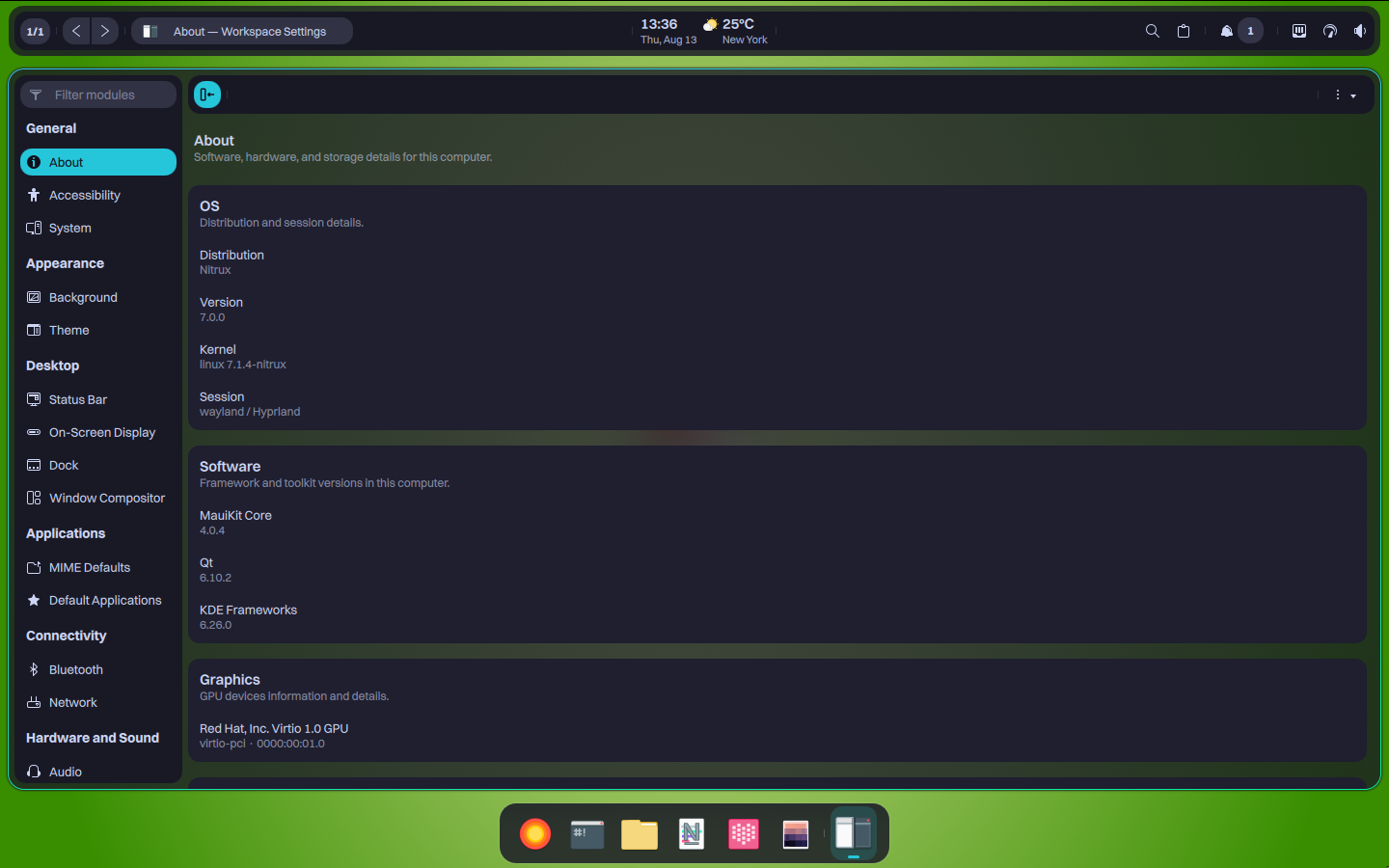
Workspace Settings in Nitrux.
Historically, Nitrux utilized KDE System Settings to manage system configuration. Following our departure from the Plasma Desktop, we retained it temporarily to provide a graphical interface for administrative tasks. However, KDE System Settings strictly targets the KDE ecosystem. It assumes the presence of Plasma, KWin, SDDM, and systemd. These architectural dependencies conflict directly with our infrastructure and design goals.
To eliminate this dependency, I revived and rebuilt a legacy Maui Shell component, officially renaming it Workspace Settings.
While the original application was inherently tied to the legacy Maui Shell, Workspace Settings serves a dual purpose in our modern architecture. First, it acts as the dedicated configuration interface for our new, independent shell components, such as Valenz and Marina. Second, it completely replaces KDE System Settings as the distribution’s primary control center. It natively handles core user-facing parameters, including display system information, user management, locale, network and Bluetooth management, MauiKit parameters, audio, appearance, etc.
This transition ensures that our administrative tools share the same UI framework as our desktop shell, completing a cohesive, first-party user experience.
Introducing: Desklock
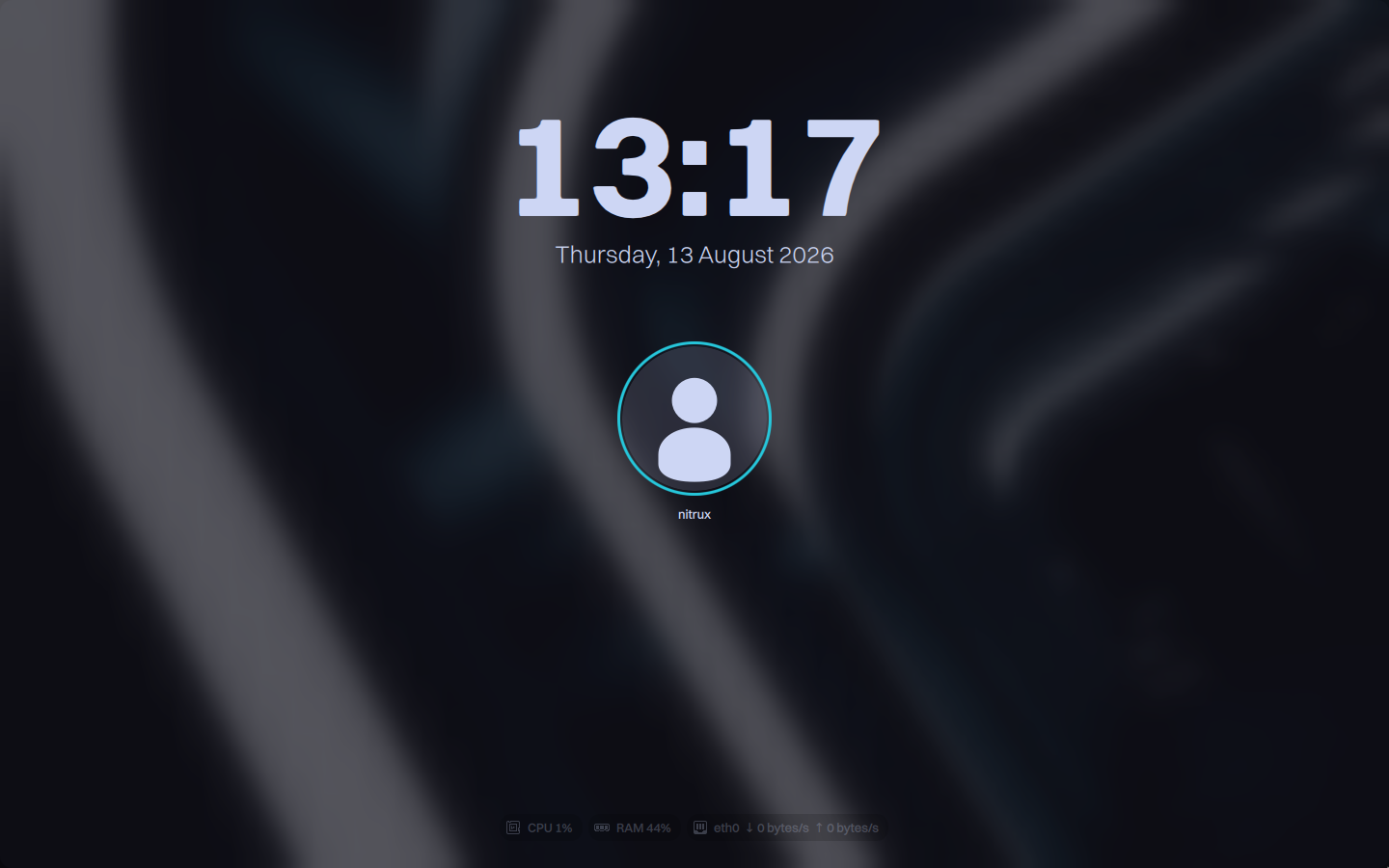
Desklock, a lock screen built with MauiKit.
Technical friction extended beyond the panel and dock components. Since Nitrux 5.0.0, we deployed Hyprlock as our default session locker. However, Hyprlock lacks visual cohesion with our MauiKit UI framework, and it suffers from a persistent state bug upon resuming from suspension or hibernation.
To ensure a reliable, fully integrated lock screen, I engineered Desklock.
Because Desklock derives directly from the QMLGreet codebase, the two components share the same secure lifecycle and visual identity. This shared foundation minimizes maintenance overhead while strictly enforcing our unified architectural philosophy. It provides a native QML session locker that executes its single responsibility perfectly, completing the visual and functional ecosystem of the Workspace Environment.
Desklock is best described as a native QML session locker for Wayland environments.
- Features:
- Secure lifecycle with one lock surface for every connected output.
- Direct Linux PAM authentication of the user running Desklock.
- CPU, memory, and network monitors.
- Native MPRIS discovery, metadata, album art, and playback controls over the session D-Bus.
- Configurable fade-in/fade-out durations and clock formats.
With the foundational tools established, the architectural framework that governs them requires explicit definition.
Why “Workspace Environment”?
The term pays homage to classic workstation interfaces of the late 20th century, such as NeXT, IRIX, CDE, and BeOS.
Furthermore, abandoning the word “Desktop” deliberately distances our architecture from the historically mainstream, monolithic metaphor. It accurately reflects the terminology of the designated compositor, Hyprland, reinforcing a focus on managing dynamic workspaces rather than a static desktop plane.
Analyzing those early workstation interfaces reveals a critical structural advantage that modern desktop environments lost to feature creep. While their visual paradigms are obsolete, their functional architecture was strictly compartmentalized. This strict functional isolation prevented overlapping responsibilities and code bloat.
The Workspace Environment resurrects this engineering discipline. It applies the focused, single-responsibility architecture of classic workstations to a modern Wayland stack, stripping away the tangled dependencies of contemporary monolithic desktops.
Defining the Workspace Environment
Historically, the Linux ecosystem recognized a strict binary: operating systems provided either a bare window manager (minimalist, like Openbox) or a monolithic desktop environment (tightly coupled, like GNOME or KDE Plasma). This binary is outdated.
When an operating system pairs a designated Wayland compositor with a bespoke shell bar (Valenz), a custom dock (Marina), and a unified suite of first-party applications, calling that stack a “Window Manager” is an understatement. However, calling it a “Desktop Environment” remains technically false.
The concept of a Workspace Environment (WE) bridges this semantic gap. It describes a system that provides the cohesive visual framework of a traditional desktop environment while strictly rejecting its monolithic process tree. The following five-layer stack defines exactly where this concept sits and how it achieves a modular user space through lifecycle independence and protocol specificity.
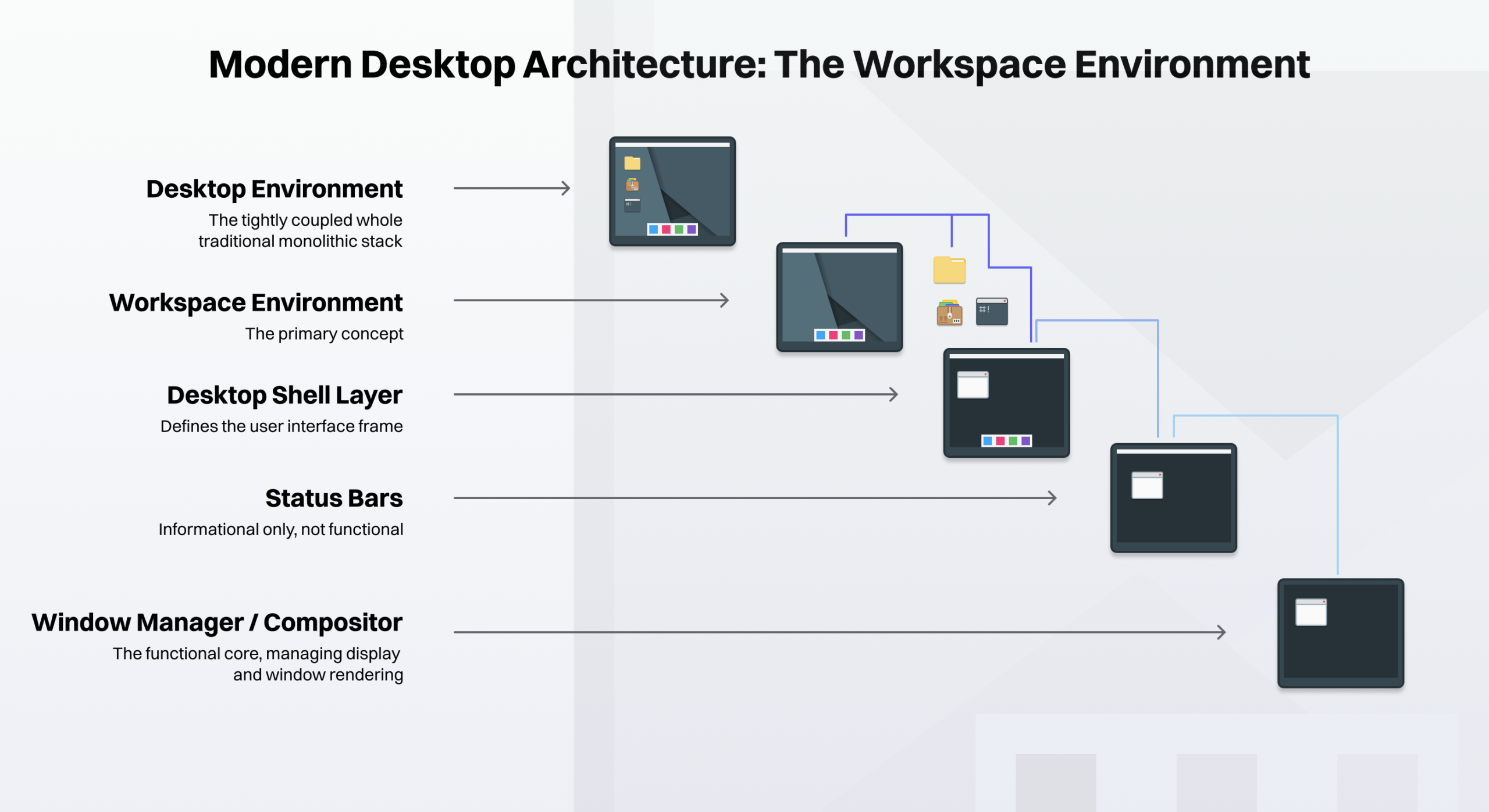
Five-layer hierarchy diagram.
Layer 1: Window Manager or Compositor
The core display server, spatial window renderer, and hardware allocator. It provides zero user interface utilities.
A compositor does not simply draw geometry. It exposes the essential display server APIs that higher layers require to function. Tools in Layer 2 and Layer 3 cannot exist in a vacuum; they depend directly on the protocol capabilities (such as wlr-layer-shell or xdg-shell) exported by Layer 1.
- Real-world examples: Hyprland, Sway, KWin, Mutter, Openbox.
Layer 2: Status Bars
The static display of information (time, battery, network status). They provide no interactivity unless communicating with an external module.
Layer 2 acts strictly as a passive information subscriber. It reads system states (like /sys/class/power_supply/or read-only DBus signals) and paints them on the screen. It does not manipulate session state or spawn interactive overlay surfaces.
- Real-world examples: Waybar, Polybar, Tint2, Lemonbar.
Layer 3: Desktop Shell
The cohesive visual frame that constructs a functional desktop workspace. It provides top panels, bottom docks, system trays, notifications, and application launchers.
Unlike Layer 2, Layer 3 introduces active state orchestration. It hosts interactive event loops (notification daemons, session logout runners, Polkit authentication agents, and quick-setting drawers) that actively send commands across the system bus to alter system state.
This layer unifies disparate modules into a single visual design language, but it does not provide native desktop applications.
- Real-world examples: Valenz, Marina, SwayNC, Wlogout, etc., with Quickshell classified separately as Layer 3 Infrastructure.
- 🔰 Information: Quickshell does not fit perfectly into one of the operational tiers (Layers 1 through 5) because it is not an end-user product; it is a Construction Framework. Under this categorization, Quickshell would be classified as Layer 3 Infrastructure. It provides the raw QML bindings to the
wlr-layer-shellWayland protocols. An end-user cannot run Quickshell to get a desktop. A developer runs Quickshell to build Layer 3 components (status bars, docks, notification centers).
- 🔰 Information: Quickshell does not fit perfectly into one of the operational tiers (Layers 1 through 5) because it is not an end-user product; it is a Construction Framework. Under this categorization, Quickshell would be classified as Layer 3 Infrastructure. It provides the raw QML bindings to the
Layer 4: Workspace Environment
Integrates the cohesive visual frame (Layer 3) with a strictly defined suite of SCDUs (Session Core Domain Utilities, i.e., the File Manager, Terminal Emulator, System Settings, and Authentication Agent) to form a complete, operational user space.
A Workspace Environment rejects the monolithic process tree of traditional desktop environments. The shell components and session utilities execute as an independent process hierarchy governed by a rootless user-session supervisor (Lifecycle Decoupling). This ensures the desktop shell’s lifecycle remains completely independent of the display server.
Rather than degrading performance through generic abstraction layers, the Workspace Environment binds directly to the specific Wayland protocols of its designated Tier 1 compositor (Protocol Specificity). This creates a tightly integrated, first-party user experience that retains modular process isolation.
- Real-world examples: A cohesive stack utilizing Valenz, Marina, and MauiKit applications managed by an independent user-session supervisor.
Layer 5: Desktop Environment
The traditional, monolithic user experience. The shell, core apps, and compositor are co-developed and tightly bound to one another.
Layer 5 binds the display server, shell, and applications into a shared process tree using private internal APIs or tightly coupled session daemons. If the compositor in a monolithic desktop environment crashes, the entire session state and all child applications typically terminate simultaneously.
- Real-world examples: GNOME, KDE Plasma, Xfce, MATE.
You might notice that these feature lists are brief. That is exactly the point.
When we released Nitrux 5.0.0, the driving logic behind our development was to focus on simplification and downsizing.
Neither Valenz nor Marina attempts to be the next Plasma Desktop, nor do they aim to compete with Quickshell. They execute the standard we established: distinct tools that do one job well, bound together by a unified UI framework.
Marina functions strictly as a dock. Valenz functions strictly as a workspace bar. They do not overlap and operate independently, ensuring a strict separation of concerns.
Furthermore, because these tools utilize the MauiKit UI framework, they enforce a strict, cohesive design language. We understand that infinite visual customization is a popular goal within the broader Linux ecosystem. We contributed extensively to that exact space in the past.
Users seeking an infinitely malleable visual experience have excellent tools at their disposal, including those mentioned. However, that prior experience directly informed our current trajectory.
Valenz, Marina, Desklock, NudgeOSD, and QMLGreet serve a different purpose. They provide a curated, purpose-built visual identity out of the box, reinforcing our core philosophy.
The Workspace Environment ultimately brings closure to the Maui Shell saga, and its repository is now archived. Its legacy lives on as the foundation for a new milestone in Nitrux.
There will be other updates to come in the next version of Nitrux, so stay tuned.