
The Workspace Environment is Nitrux’s answer to a problem modern desktops have normalized. A desktop should provide one coherent workspace without forcing every function into a single shell, session, or process hierarchy.
Why “Workspace Environment”?
The term pays homage to classic late-20th-century workstation interfaces, such as NeXT, IRIX, CDE, and BeOS.
Furthermore, abandoning the word “Desktop” deliberately distances our architecture from the historically mainstream, monolithic metaphor. It accurately reflects the terminology of the designated compositor, Hyprland, reinforcing a focus on managing dynamic workspaces rather than a static desktop plane.
Analyzing those early workstation interfaces reveals a critical structural advantage that modern desktop environments lost to feature creep. While their visual paradigms are obsolete, their functional architecture was strictly compartmentalized. This strict functional isolation prevented overlapping responsibilities and code bloat.
The Workspace Environment resurrects this engineering discipline. It applies the focused, single-responsibility architecture of classic workstations to a modern Wayland stack, stripping away the tangled dependencies of contemporary monolithic desktops.
Defining the Workspace Environment
Historically, the Linux ecosystem recognized a strict binary: operating systems provided either a bare window manager (minimalist, like Openbox) or a monolithic desktop environment (tightly coupled, like GNOME or KDE Plasma). This binary is outdated.
When an operating system pairs a designated Wayland compositor with a bespoke shell bar (Valenz), a custom dock (Marina), and a unified suite of first-party applications, calling that stack a “Window Manager” is an understatement. However, calling it a “Desktop Environment” remains technically false.
The Workspace Environment (WE) concept bridges this semantic gap. It describes a system that provides the cohesive visual framework of a traditional desktop environment while strictly rejecting its monolithic process tree. The following five-layer stack defines exactly where this concept sits and how it achieves a modular user space through lifecycle independence and protocol specificity.
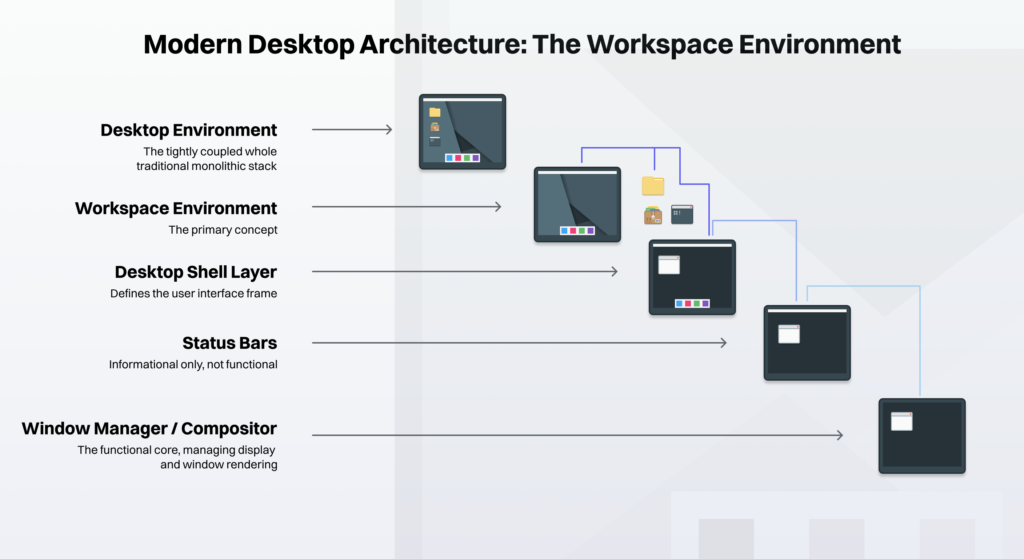
Five-layer hierarchy diagram.
Layer 1: Window Manager or Compositor
The core display server, spatial window renderer, and hardware allocator. It provides zero user interface utilities.
A compositor does not simply draw geometry. It exposes the essential display server APIs that higher layers require to function. Tools in Layer 2 and Layer 3 cannot exist in a vacuum; they depend directly on the protocol capabilities (such as wlr-layer-shell or xdg-shell) exported by Layer 1.
- Real-world examples: Hyprland, Sway, KWin, Mutter, Openbox.
Layer 2: Status Bars
The static display of information (time, battery, network status). They provide no interactivity unless communicating with an external module.
Layer 2 acts strictly as a passive information subscriber. It reads system states (like /sys/class/power_supply/ or read-only DBus signals) and paints them on the screen. It does not manipulate session state or spawn interactive overlay surfaces.
- Real-world examples: Waybar, Polybar, Tint2, Lemonbar.
Layer 3: Desktop Shell
The cohesive visual frame that constructs a functional desktop workspace. It provides top panels, bottom docks, system trays, notifications, and application launchers.
Unlike Layer 2, Layer 3 introduces active state orchestration. It hosts interactive event loops (notification daemons, session logout runners, Polkit authentication agents, and quick-setting drawers) that actively send commands across the system bus to alter system state.
This layer unifies disparate modules into a single visual design language, but it does not provide native desktop applications.
- Real-world examples: Valenz, Marina, SwayNC, Wlogout, etc., with Quickshell classified separately as Layer 3 Infrastructure.
- 🔰 Information: Quickshell does not fit perfectly into one of the operational tiers (Layers 1 through 5) because it is not an end-user product; it is a Construction Framework. Under this categorization, Quickshell falls under Layer 3 Infrastructure. It provides the raw QML bindings to the
wlr-layer-shellWayland protocols. An end-user cannot run Quickshell to get a desktop. A developer runs Quickshell to build Layer 3 components (status bars, docks, notification centers).
- 🔰 Information: Quickshell does not fit perfectly into one of the operational tiers (Layers 1 through 5) because it is not an end-user product; it is a Construction Framework. Under this categorization, Quickshell falls under Layer 3 Infrastructure. It provides the raw QML bindings to the
Layer 4: Workspace Environment
Integrates the cohesive visual frame (Layer 3) with a strictly defined suite of SCDUs (Session Core Domain Utilities, i.e., the File Manager, Terminal Emulator, System Settings, and Authentication Agent) to form a complete, operational user space.
A Workspace Environment rejects the monolithic process tree of traditional desktop environments. The shell components and session utilities execute as an independent process hierarchy governed by a rootless user-session supervisor (Lifecycle Decoupling). This ensures the desktop shell’s lifecycle remains completely independent of the display server.
Rather than degrading performance through generic abstraction layers, the Workspace Environment binds directly to the specific Wayland protocols of its designated Tier 1 compositor (Protocol Specificity). This creates a tightly integrated, first-party user experience that retains modular process isolation.
- Real-world examples: A cohesive stack utilizing Valenz, Marina, and MauiKit applications managed by an independent user-session supervisor.
Layer 5: Desktop Environment
The traditional, monolithic user experience. The shell, core apps, and compositor are co-developed and tightly bound to one another.
Layer 5 binds the display server, shell, and applications into a shared process tree using private internal APIs or tightly coupled session daemons. If the compositor in a monolithic desktop environment crashes, the entire session state and all child applications typically terminate at the same time.
- Real-world examples: GNOME, KDE Plasma, Xfce, MATE.
Information
See Workspace Architecture → Workspace Compartmentalization for additional information.